In CRM workflows, positive intent triggers are a game-changer. They let you automate follow-ups when contacts respond positively to your outreach, ensuring you stay on top of every opportunity. Whether you’re running a reactivation campaign or promoting a limited-time offer, these triggers help convert potential leads into meaningful engagements without manual intervention.
Set Up the workflow
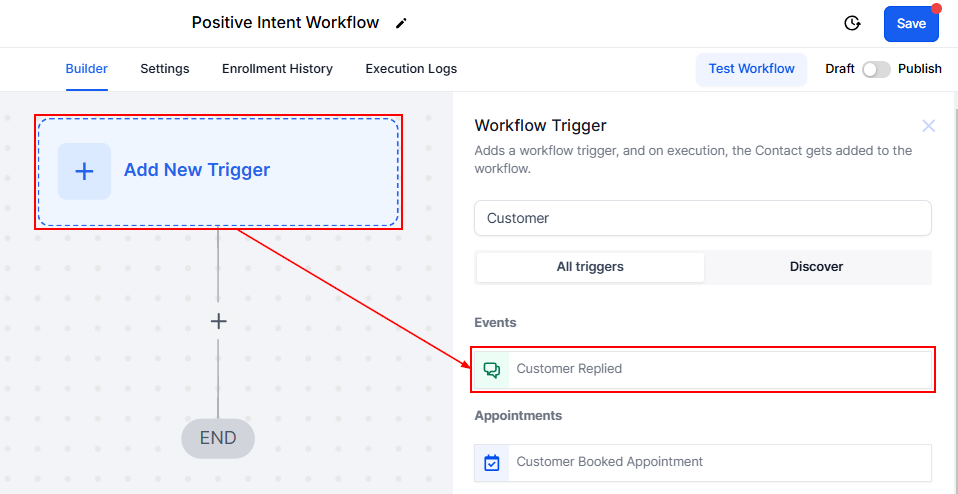
Navigate to the “Workflows” section within the CRM and create a workflow from scratch. Select the “Customer Replied” trigger option.
Choose SMS as the reply channel. Set the intent type to “Yes”, which captures positive responses like “Positive/Yes,” or “Negative/No.” Add campaign-specific filters, ensuring only relevant replies activate the trigger.
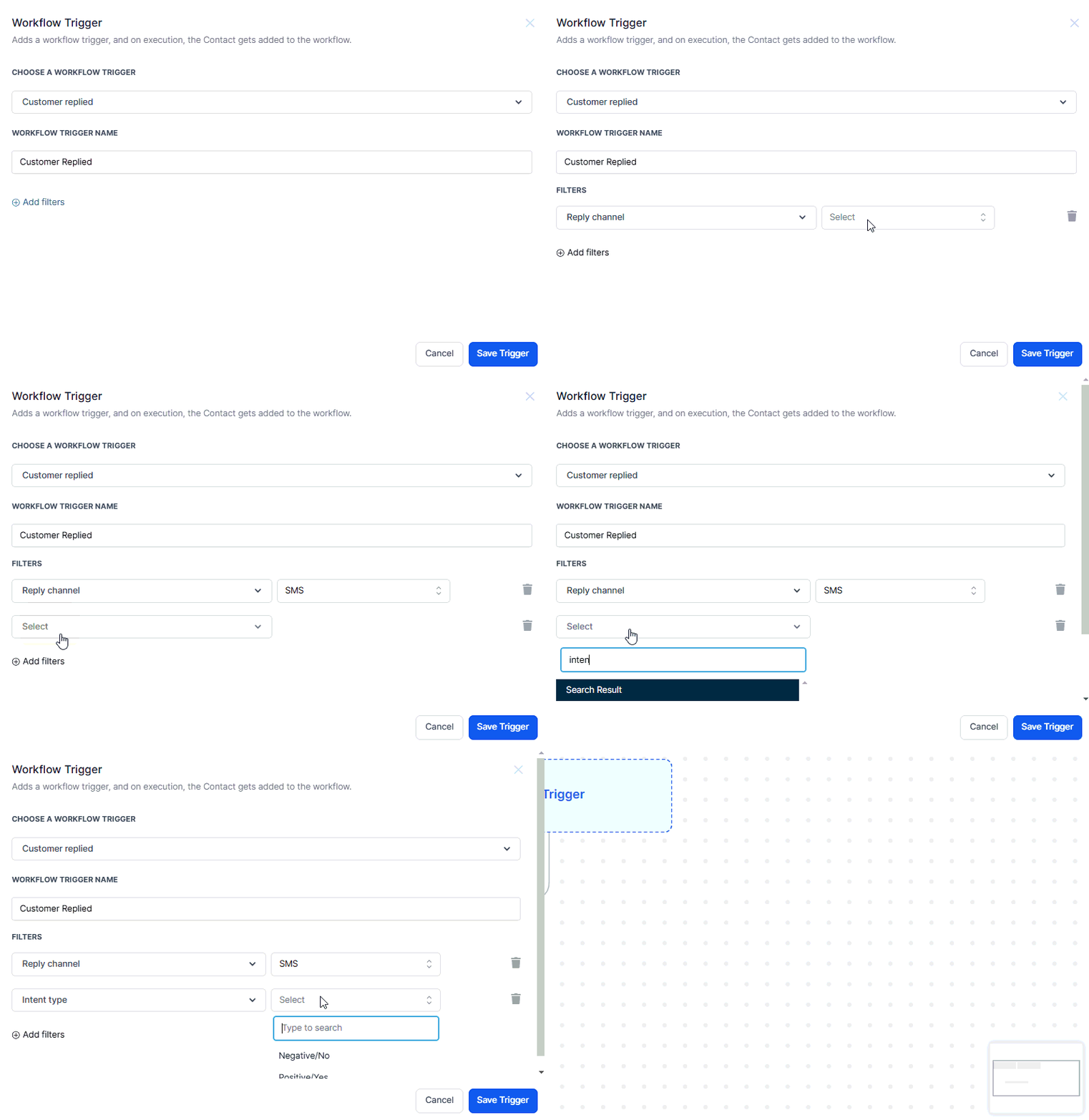
NOTE: You can Include follow-up actions, such as sending a link for booking a call or accessing a special offer.
Testing Positive Intent Trigger
After setting up your trigger, it's crucial to test it to ensure it works as expected:
- Add Yourself to the Campaign: Insert your profile into the outreach workflow to receive the initial text.
- Reply Positively: Respond with a positive word, like “Sure,” and check if the system detects it.
- Validate Follow-Up Actions: Confirm you are added to the appropriate workflow and receive the intended follow-up message.
Use Case
Picture this, you’re running a database reactivation campaign. A text message goes out to your contacts saying, “Hey, we have an exciting offer! Are you interested?” When someone responds positively—maybe with a “Yes” or “Absolutely”—the CRM instantly sends a follow-up message with a call-to-action.
Positive intent triggers empower businesses to respond promptly to potential leads who express interest, boosting engagement and conversions. With the right setup and testing, these triggers can streamline your follow-up process, ensuring your outreach efforts translate into meaningful interactions.
Troubleshooting & FAQs
- Trigger Not Firing: Ensure that the reply channel and workflow specifics are correctly set up. Double-check the intent type to ensure it matches the expected positive responses.
- No Follow-Up Message Received: Verify that the workflow has been saved and published. Check if there are any conditions or filters that might be preventing the trigger from executing.
- Can I set up triggers for negative replies: Yes, you can create separate triggers to handle negative replies, though this guide focuses on positive intent.
Was this article helpful?
That’s Great!
Thank you for your feedback
Sorry! We couldn't be helpful
Thank you for your feedback
Feedback sent
We appreciate your effort and will try to fix the article